Getting started
A gentle, ~15-minute walk from nothing to a working agent that writes a file, stops before deleting one, and remembers what you tell it to. By the end you will have created an agent, run it, watched the destructive-action gate fire, and approved a memory — the whole loop, on your own machine.
This is the on-ramp. When you want the separation guarantees proven — one agent's memory and secrets provably invisible to another — read the five-claims walkthrough; it is the skeptic's version of this page.
About the output below
The structural output — what init, new, config, memory inspect, and
events tail print — is exactly what you'll see. But an agent is driven by a
model, so the prose it writes and the order it does things vary from run to
run. The agent transcripts here are illustrative, not output you should
expect to reproduce word for word.
Before you start
You need a JavaScript runtime (Node 22.19+, Bun, or Deno) and, for the parts where
the agent actually does something, a model. If you haven't yet, skim
Installation — it covers all three runtimes and the
model setup. This page assumes you can run asterism (or a runner prefix like
npx @qmilab/asterism).
1. Initialize a home
From the directory where you want Asterism to keep its state:
$ asterism init
Initialized Asterism in /Users/you/work/.asterism
Create your first agent:  asterism new <name> --role "..." --trust propose
That .asterism/ directory is the whole install — one local database plus a
workspace folder per agent. Every command from here on finds it by walking up
the directory tree, the way git finds its repo, so it works from this directory
and anything beneath it. Re-running init is safe; an existing home is left
untouched.
2. Create your first agent
An agent is a separate identity you create in one command. Let's make one that helps with blog drafts:
$ asterism new writer --soul casual-helper --role "drafts and tightens blog posts" --trust autonomous
Created agent "writer" (autonomous) — soul: casual-helper
  role: drafts and tightens blog posts
  workspace: /Users/you/work/.asterism/agents/writer
Three things shaped that agent — the three you'll set most often:
--soulis its character: voice, values, operating style. Two souls ship built in —casual-helper(warm, direct, gets to the point) andcareful-consultant(measured, surfaces risks first). You can also point--soulat your own Markdown file. A soul is nothing exotic; it's a small persona that frames how the agent talks and works.--roleis one line saying what the agent is for. It rides along on every run.--trustis how much the agent may do on its own. We'll come back to this — it's the most important dial Asterism gives you.
Everything this agent comes to know — its memory, its secrets, its skills, its workspace — lives under its own name and is invisible to every other agent you create. That separation is the whole point; see Concepts.
3. Point it at a model
Creating agents, inspecting memory, and reading the event log all work with no
model at all. But to make writer actually do something, give Asterism a model.
No API key to hand? If you run Ollama or LM Studio, naming it as the provider is the whole setup — no key, no account, and nothing your agents write leaves your machine:
$ asterism config set llama3.2 --provider ollama
Set the model for the install default: llama3.2 (provider: ollama).
API keys are never stored here — keep them in the environment (e.g. OPENAI_API_KEY).
With a hosted provider, the key lives in your environment; the choice of model is saved locally (never the key). The rest of this tutorial follows this path, but it reads the same either way:
$ export OPENAI_API_KEY=sk-...
$ asterism config set gpt-4o
Set the model for the install default: gpt-4o.
API keys are never stored here — keep them in the environment (e.g. OPENAI_API_KEY).
Check what each agent resolves to:
$ asterism config
Configuration  (/Users/you/work/.asterism/config.json)

Install default model: gpt-4o

Per-agent model:
  writer  →  gpt-4o (provider: openai)  [install default]

API keys are never stored here — set them in the environment (e.g. OPENAI_API_KEY).
Using Anthropic, OpenRouter, or another provider instead? The full list, and the per-agent overrides, are in Models and providers.
4. Run a task
Now ask writer to do something. Each agent works inside its own workspace
directory, so file paths are relative to that:
$ asterism run writer "write a two-line welcome note to posts/hello.md"
  → write_file
  ✓ write_file
Actions (1 executed):
  ✓ executed fs.write (write)
Done — posts/hello.md now has a short welcome note.
What just happened. writer is autonomous, so it acted on its own. It
called its write_file tool, the file landed in its workspace
(.asterism/agents/writer/posts/hello.md), and the run ended with a short
action summary — the tally of what it did. That summary and the live
→/✓ activity are printed to standard error; only the agent's own
response goes to standard out, so you can pipe a run cleanly.
The tools an agent has
Out of the box, asterism run gives every agent a catalog of
workspace-scoped file tools: read_file, list_dir, stat, and find to
look around, plus write_file, append_file, mkdir, and move to change
things and delete_file to remove them.
They're confined to the agent's own workspace — a path that climbs out
(.., an absolute path) is refused. That's logical scoping, not an
OS-enforced jail (see what isolation means today).
5. Watch the gate fire
Here's the moment that makes autonomy safe to use. Ask writer to delete the
file it just made:

$ asterism run writer "delete posts/hello.md, it's no longer needed"
Run paused: a destructive action needs your confirmation before it can proceed.
Confirm it to continue:  asterism confirm writer 62dd81a6
The run also prints a one-line summary to standard error, naming the action it stopped on:
Actions (1 paused):
  ⏸ paused   fs.delete (destructive)
What just happened — and why it matters. writer is autonomous, the
highest trust level. It still stopped. Deleting a file is a destructive
action, and the destructive-action gate fires regardless of trust level. The
agent acted freely right up to the irreversible step, and there it waited for an
explicit yes. Nothing was deleted; the run is parked, and you can walk away — it
will wait.
When you're ready, confirm exactly that one action:
$ asterism confirm writer 62dd81a6
  → delete_file
  ✓ delete_file
Actions (1 executed):
  ✓ executed fs.delete (destructive)
Deleted 'posts/hello.md'.
Confirming approves only the action the run paused on, for this run alone — a
bounded grant, not a blanket on deleting. A later delete of a different file pauses
again for its own confirmation. (For runs that paused with no one watching — say,
one started over HTTP or from a pipe — asterism confirm is how you
clear them from anywhere.)
This gate is the difference between "a local database of agents" and an agent you
can actually let act on its own. It's the same at notify and autonomous; trust
level never switches it off.
A word on the trust levels
You set --trust autonomous above. There are three levels, a deliberate ramp you
dial up as you come to trust an agent:
| Level | What it does |
|---|---|
propose (default) |
Never acts on its own. Hands you a plan to run yourself. |
notify |
Acts on its own, then shows you each action afterward. It does not ask first. |
autonomous |
Acts freely, keeping a reviewable record of everything it did. |
The one thing worth saying twice: notify does not ask before acting. It
acts, then notifies. If you want approval before anything happens, use
propose. And the gate holds at every level: notify and autonomous stop and
ask before an irreversible step — unless you have allowed that capability for the
agent — and propose never takes one at all.
Change a level any time:
$ asterism trust writer notify
Set writer to notify.
6. Let it learn — on your review
Agents accumulate memory, but never silently. Right now writer knows
nothing:
$ asterism memory inspect writer
writer has no memories yet.
Reflection looks back over an agent's latest run and proposes typed memories it might keep. You accept, edit, or reject each one — nothing is written without your say-so:
$ asterism reflect writer --review
Reviewing 2 proposed memories for writer (from run 62dd81a6).
Nothing is saved unless you accept it.

(1/2) convention · confidence 0.86
  New posts go in the posts/ folder.
  Keep this memory? [a]ccept / [e]dit / [r]eject / [q]uit (default: reject): a
  ✓ saved

(2/2) procedural · confidence 0.78
  Delete old drafts once a post is published.
  Keep this memory? [a]ccept / [e]dit / [r]eject / [q]uit (default: reject): r
  ✗ rejected

Done — 1 saved, 1 rejected.
Exactly what you accepted persists — typed, attributed to the run it came from, and screened by a safety filter before you ever see it. Inspect it now:
$ asterism memory inspect writer
Memory for writer (1):

• convention · accepted · confidence 0.86
  New posts go in the posts/ folder.
  recorded 2026-06-17T18:58:02.152Z · from run 62dd81a6
The rejected proposal left no trace. Reflection is model-generated, so the exact proposals and confidence scores differ every run — the ones above are illustrative. What never varies is the rule: nothing is remembered unless you approve it.
7. See everything it did
Every consequential action is on an append-only event log — created, trust changed, run started, action executed or paused, memory recorded. It records references, never values (you'll never find a secret in it):
$ asterism events tail writer
Activity for writer (9):

2026-06-17T18:58:02.081Z  agent.created
  {"name":"writer","role":"drafts and tightens blog posts","trustLevel":"autonomous"}
2026-06-17T18:58:02.112Z  run.started  run=3bc716c5
  {"runId":"3bc716c5-…","status":"pending"}
2026-06-17T18:58:02.123Z  action.executed  run=3bc716c5
  {"capability":"fs.write","effect":"write","fingerprint":"6afdce94…"}
2026-06-17T18:58:02.136Z  action.awaiting_confirmation  run=62dd81a6
  {"capability":"fs.delete","effect":"destructive","fingerprint":"e24f1445…"}
2026-06-17T18:58:02.143Z  run.resumed  run=62dd81a6
  {"runId":"62dd81a6-…","from":"awaiting_confirmation","confirmed":["fs.delete"],"granted":[{"capability":"fs.delete","fingerprint":"e24f1445…","count":1}]}
(Trimmed for readability — your log also has a run.status_changed row at each
step, and the long run ids and fingerprints are shown shortened with …. Narrow
the log with asterism events tail writer --type action.executed.)
8. Watch every agent at once
One command at a time is fine for one agent. Once you have a few, open the dashboard — a live terminal console over all of them:
$ asterism dashboard
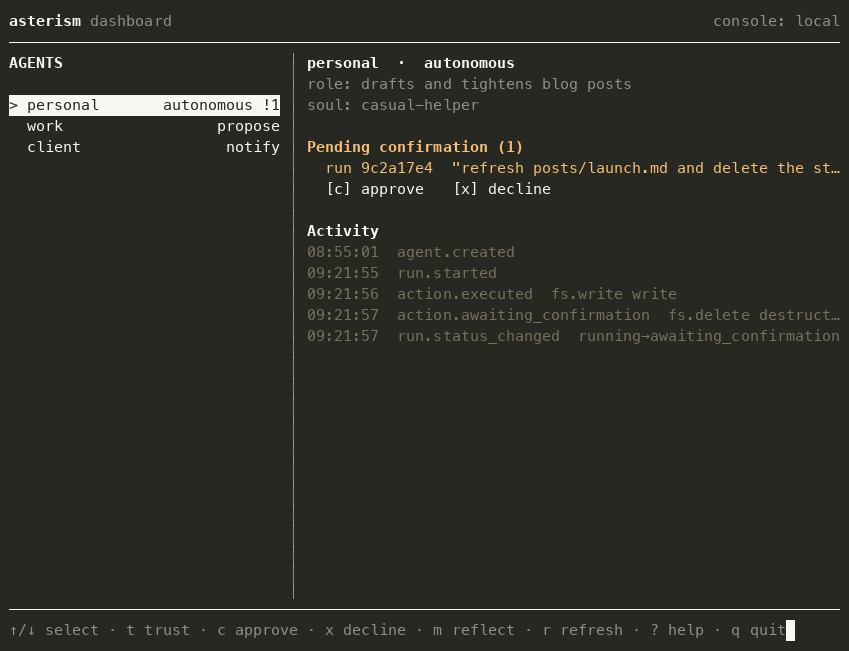
From there you can see the roster, dial autonomy up or down, approve or decline a paused action, and review proposed memories — all without leaving the view. It holds no powers of its own; it's a thin client over the same surface the command line uses, so every boundary still applies. See Dashboard.
Where to go next
You've done the whole loop. From here:
- Concepts — agents, souls, trust, memory, and exactly what "separate" means today.
- Five-claims walkthrough — two agents, and proof that one can never read the other's memory or secrets.
- Command reference — every command and option in detail.
- Give an agent a secret or a skill —
asterism secrets addandasterism skill add, both scoped to one agent and shared with no other.